Social media is moving faster. Content is king, but consistency is the kingdom. For creators and marketers, the biggest hurdle isn’t just making a great video. It’s making sure that video reaches people on TikTok, Reels, and Shorts. This is where Vizard AI enters the frame. It promises to take the heavy lifting out of editing by using artificial intelligence to chop long-form content into viral-ready snippets. In this review, we dive deep into the features, costs, and performance of Vizard AI to see if it truly lives up to the hype in 2026.
What is Vizard AI?
Vizard AI is a specialized cloud-based video editing platform designed specifically for the era of short-form vertical content. Instead of forcing users to manually scrub through hours of footage, Vizard uses advanced machine learning to identify the most impactful hooks and highlights within a video. Whether you have a long-form podcast, a corporate webinar, or a Zoom interview, Vizard acts as an automated producer. It handles everything from speaker detection to social media formatting, allowing brands to maintain a 24/7 social presence without hiring a full-time editing team. It is essentially a bridge between long-form depth and short-form reach.
Key Features of Vizard AI Tool
AI Clip Discovery
Vizard doesn’t just cut the video. It gives each clip a virality score. It looks for emotional spikes, keywords, and audience retention patterns.
Text-Based Video Editing
Imagine editing a video by deleting a sentence in a Word document. That is how Vizard works. If the speaker says “um” or “uh,” you just delete those words in the transcript. The video cuts perfectly. This feature alone saves hours of looking at a timeline.
Auto-Reframe 2.0
In the past, auto-reframing was shaky. In 2026, Vizard uses Deep Tracking. If a speaker moves across the room, the virtual camera follows them smoothly. It feels like a human cameraman was there.
AI B-Roll Integration
One of the newest features in 2026 is the B-Roll Generator. If a speaker talks about growth, the AI automatically suggests or inserts a stock video of a growing plant or a rising chart. This keeps the viewer engaged.
Related Post: Create Videos in Minutes with the Best AI Video Generator Tools
The Pros: Why I Love Vizard AI
The biggest win for Vizard AI is time. In my tests, I took a one-hour podcast and turned it into 10 viral clips. A human editor would take four hours to do this. The vizard did it in about 15 minutes. Here is why it works so well:
- No Learning Curve: You don’t need to know what a keyframe or timeline is. If you can use a mouse, you can use Vizard.
- Platform-Ready Templates: It has built-in styles for TikTok, Reels, and Shorts. These ensure your videos look native to each app. This helps you get more views.
- Text-Based Editing: You can edit the video just by deleting words in the transcript. This is a game-changer for non-editors.
- Global Reach: In 2026, Vizard supports over 100 languages. You can translate your video for a global audience with one click.
The Cons: Where It Falls Short
No tool is perfect. Vizard has some limits that you should know before buying:
- Internet Dependent: Vizard is cloud-based. If your Wi-Fi is slow, your editing will be slow. If your internet drops, you cannot work.
- Misses the Vibe: Sometimes the AI is too literal. It might miss a joke or a subtle piece of sarcasm. You still need to do a human pass to check the clips.
- Not for Cinema: It does not have advanced color grading like DaVinci AI. If you want a cinematic movie look, this is not the tool for you.
- Processing Times: For very long 4K videos, the AI scanning can take 20 minutes. It is not always instant.
Now Let’s Discuss the Pricing
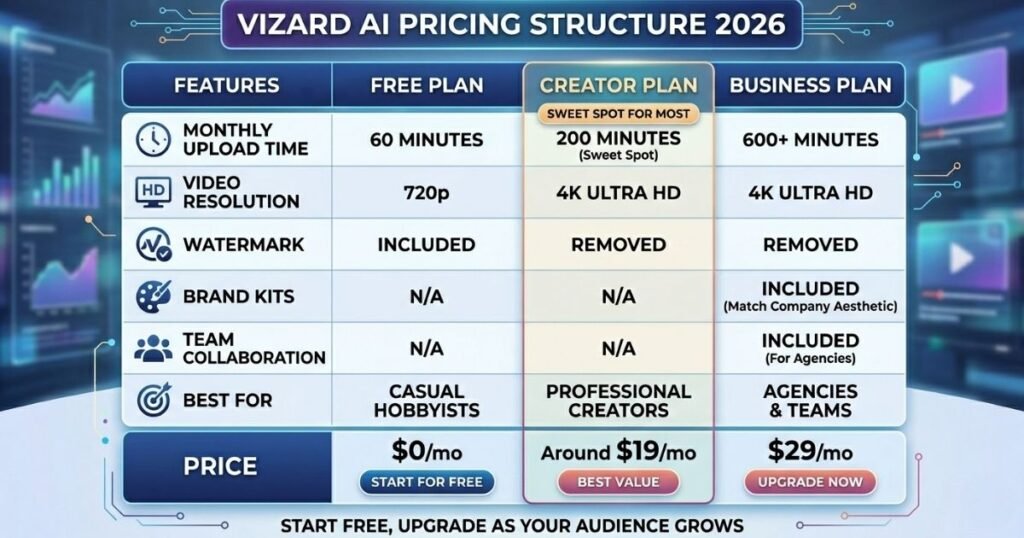
Vizard AI offers a tiered pricing structure that scales with your needs. The Free Plan is an excellent starting point, offering 60 minutes of upload time per month, though it does include a watermark and 720p resolution. The Creator Plan (around $19/mo) is the sweet spot for most, removing watermarks and boosting export quality to 4K. For agencies, the Business Plan ($29/mo) offers team collaboration features and a brand kit to ensure all videos match your company’s aesthetic. This flexibility makes it easy for solo creators to start for free and upgrade as their audience grows.
Wrap It Up
Vizard AI is a total game-changer for creators who need to scale their social media presence without spending hours in an editing suite. By automating the most tedious parts of video repurposing like finding viral hooks or generating subtitles. It allows podcasters and marketers to turn one long video into a month’s worth of content in minutes.
While it isn’t a replacement for high-end cinematic editors, its efficiency in the short-form niche is unmatched. If you want to bridge the gap between long-form depth and viral reach, Vizard AI is a must-have tool. It handles the heavy lifting of the cut so you can stay focused on your message and your audience.
FAQs
Is Vizard AI completely free?
No. While Vizard offers a free version, it is not completely free for unrestricted use. It follows a freemium model where basic features are accessible for free, but premium capabilities, higher usage limits, and the removal of watermarks require a paid subscription.
What is Vizard AI used for?
Vizard AI is primarily used for content repurposing. It is a favorite for:
- Social Media Managers: Turning long webinars or podcasts into TikToks, Instagram Reels, and YouTube Shorts.
- Podcasters & YouTubers: Automatically finding viral-worthy clips from long-form episodes.
- Marketers: Creating localized or captioned video ads quickly.
What does Vizard AI do?
It acts as an AI-powered video editor and transcription tool. Its core functions include:
- AI Clipping: Automatically identifying highlights in long videos.
- Auto-Captioning: Generating and styling subtitles in multiple languages.
- Auto-Framing: Dynamically cropping horizontal videos into vertical (9:16) formats by following the speaker.
- Transcription: Converting video/audio to text for scripts or blog posts.
How much does Vizard AI cost after the free trial?
As of 2026, Vizard typically offers two main paid tiers (with discounts available for annual billing):
- Creator Plan: Approximately $29 per month.
- Business Plan: Approximately $39 per month.
- Note: Custom Enterprise pricing is available for large teams requiring high-volume processing.
What are the limitations of Vizard AI’s free plan?
The free plan is designed for testing and very light use. Its main hurdles include:
- Watermarks: All exported videos will carry a Vizard logo.
- Transcription Limit: Usually capped at 120 minutes per month.
- Storage/Export: Limited storage for projects and lower priority for rendering speeds compared to paid users.
- Feature Gating: Certain premium caption styles or high-definition export options may be locked.
How does Vizard work?
Vizard uses machine learning and natural language processing to analyze your video.
- Upload: You upload a file or paste a YouTube/Zoom link.
- Analysis: The AI “listens” to the dialogue to understand the context and identifies shifts in topic or high-energy moments.
- Generation: It cuts the video into segments, applies a vertical layout, adds captions, and centers the speaker automatically.
- Edit/Export: You can use their web-based editor to make final manual tweaks before downloading.