⚠️ Affiliate Disclosure: We earn a commission on purchases made via our links — at no extra cost to you.

1Password vs NordPass: Password Manager Comparison Overview
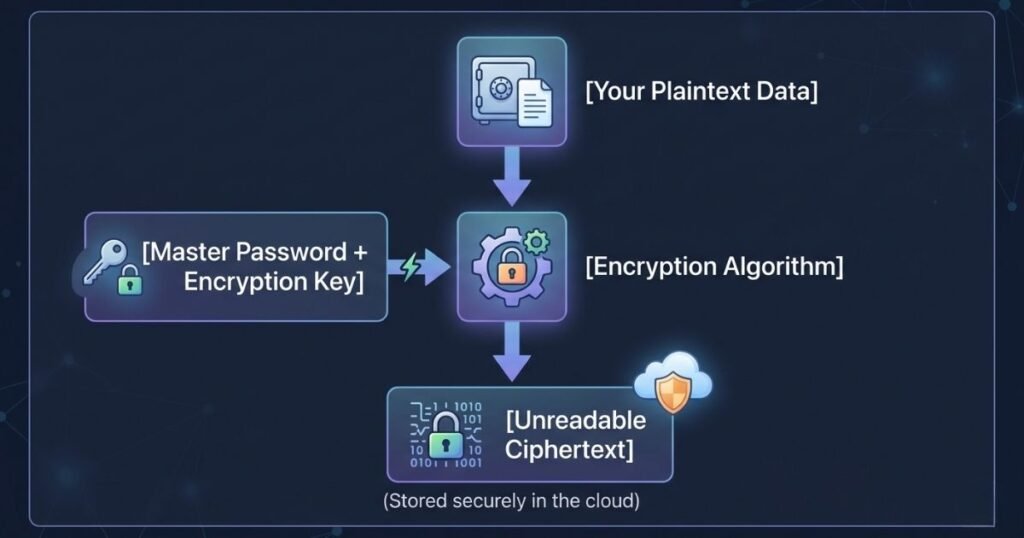
Selecting the right password manager requires looking beyond standard marketing claims to examine how these platforms protect your digital identity during daily operations. As a senior cybersecurity analyst who has stress tested both tools in enterprise and personal environments, I have evaluated 1Password and NordPass based on architecture, ease of use, and threat resilience. Both platforms operate on a zero knowledge security model, which ensures that your master password is never stored on their servers and your data remains encrypted before it leaves your device. However, they approach consumer and business security from completely different technical philosophies, resulting in unique user experiences.
1Password has long been considered the gold standard for technical users, power users, and enterprise teams due to its highly customizable vault structure and robust developer tools. It provides granular control over how data is organized, shared, and audited across multiple platforms, making it an excellent choice for complex environments. On the other hand, NordPass emerged from the security ecosystem of Nord Security, the creators of NordVPN, focusing heavily on streamlined performance, modern cryptographic standards, and ultimate simplicity for everyday users. This overview sets the stage for a deeper look into how these two industry giants handle encryption protocols, manage user interfaces, structure their pricing models, and support users in critical scenarios.
Key Differences Between 1Password and NordPass
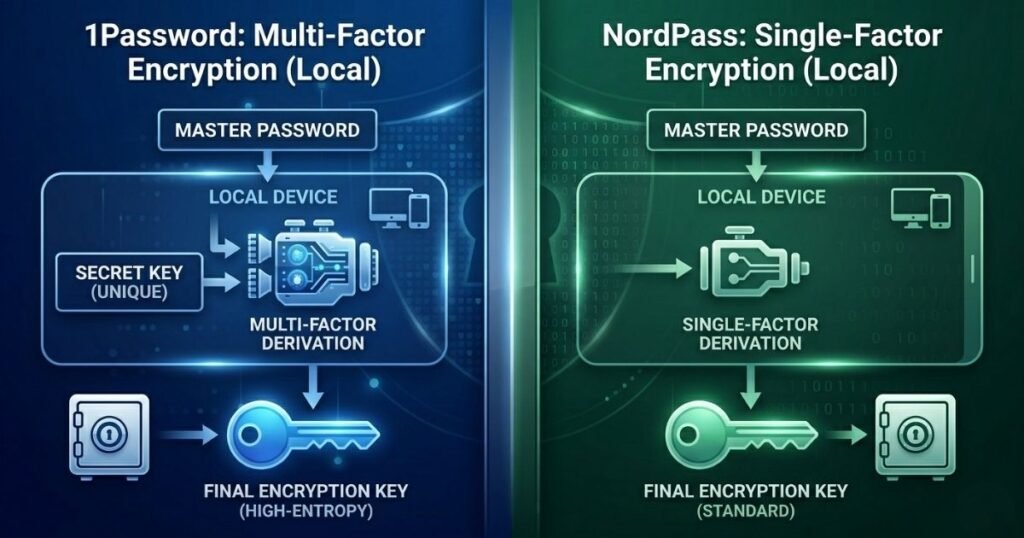
The primary distinction between these two security platforms lies in their architectural frameworks and their specialized feature sets. 1Password utilizes an additional layer of defense called a Secret Key, which is a unique thirty four character code generated locally on your machine during setup. This key combines with your master password to create an incredibly strong encryption key, meaning that even if an attacker manages to download your encrypted vault from the cloud, they cannot attempt a brute force attack without possessing this physical key. NordPass does not use a secret key, relying instead on a traditional master password coupled with robust multi factor authentication options, which simplifies the onboarding process for less technical users.
Another major difference is how they handle data item types, customization, and advanced privacy tools within the vault interface. 1Password allows you to create custom fields, tags, and multiple distinct vaults, which provides unmatched flexibility when you need to organize thousands of corporate credentials, software licenses, and secure notes. NordPass takes a more streamlined approach by offering pre-defined categories like logins, credit cards, secure notes, and personal information, which minimizes clutter but restricts advanced organization. However, NordPass offers a built in email masking feature on all paid tiers that allows you to generate random email aliases to protect your identity, whereas 1Password requires a third party integration with an external email provider to achieve similar masking capabilities.
Choose NordPass If
You should choose NordPass if you favor an intuitive, modern user experience that prioritizes rapid deployment and highly competitive long term pricing. NordPass is especially beneficial for individuals, families, and small business owners who want top tier security without dealing with the administrative overhead of managing secret keys or complex vault permissions. If your daily routine involves quickly saving credentials, accessing financial records, and avoiding phishing spam through email masking, NordPass provides a frictionless solution that operates smoothly in the background of your web browsers and mobile operating systems.
Additionally, NordPass is the ideal selection if you are working within a strict budget or looking for a permanent free option to manage basic credentials. Because NordPass offers a lifetime free plan that allows you to store an unlimited number of passwords on a single active device, it serves as an excellent entry point for personal security. Furthermore, if you are looking to purchase a multi year subscription, NordPass offers steep discounts on its two year plans that make it significantly more affordable than 1Password over time. If you prefer a password manager that simply works out of the box with minimal configuration, NordPass is the clear winner for your needs.
Choose 1Password If
You should choose 1Password if your lifestyle or business operations demand advanced security controls, granular data isolation, and specialized tools for travel or development. 1Password is the industry leader for professionals who need to manage separate vaults for personal use, family logistics, and distinct business projects while maintaining strict boundaries between them. If you are a developer, software engineer, or IT administrator, 1Password provides native support for SSH keys, a command line interface, and developer tools that allow you to manage secrets directly within your development workflows.
Furthermore, 1Password is essential for users who travel frequently across international borders and want to protect their sensitive data from physical device inspections. The platform features a unique capability called Travel Mode, which allows you to mark specific vaults as safe for travel while completely removing sensitive vaults from your local device when you cross borders. Once you arrive at your destination safely, you can toggle Travel Mode off to securely download your sensitive vaults back onto your device from the encrypted cloud. If you require this level of operational security, detailed audit logs, and highly customizable data structures, 1Password is well worth the premium price.
Security Protocols Explained Simply
To truly understand how 1Password and NordPass safeguard your credentials, we must examine the underlying mathematical algorithms that lock away your data. 1Password relies on Advanced Encryption Standard 256 bit encryption, commonly known as AES 256, which has been the global government and military standard for decades. To picture how this works, imagine your password vault is placed inside a digital safe that requires a key consisting of two hundred and fifty six ones and zeros. The number of possible combinations to crack this safe is so immense that even if every supercomputer on earth worked together for billions of years, they could not break it by guessing.
In contrast, NordPass utilizes a newer cryptographic standard known as XChaCha20, which is paired with the Poly1305 authenticator to ensure data integrity. While AES 256 is incredibly secure, it requires specialized hardware acceleration built into modern computer chips to run at maximum efficiency without draining your device battery. XChaCha20 is a stream cipher that is designed to run exceptionally fast on all types of hardware, including older smartphones, budget tablets, and machines without dedicated cryptographic processors. From a security standpoint, both algorithms are completely uncrackable using modern technology, meaning your choice comes down to whether you prefer the time tested industry standard of AES 256 or the modern efficiency of XChaCha20.
Pricing, User Interface, and Customer Support
When evaluating the financial commitments, NordPass clearly takes the lead for budget conscious consumers by providing a flexible tier structure. NordPass offers a lifetime free plan, a monthly option, a one year plan, and a deeply discounted two year subscription plan that brings the monthly cost down significantly. 1Password does not offer a free tier at all, choosing instead to provide a fourteen day free trial before requiring users to subscribe to their annual individual or family plans. While 1Password is undeniably more expensive, the company justifies its pricing by providing larger cloud storage allocations for documents and a more extensive suite of advanced security configurations.
- NordPass Pricing Summary
- Lifetime free tier allows unlimited passwords on one active device at any time.
- Premium personal plans are billed annually or biennially with significant long term discounts.
- Family plans support up to six independent users with shared folders and emergency access features.
- Business plans include a centralized admin dashboard and basic policy enforcement tools.
- 1Password Pricing Summary
- No free tier is available but a fourteen day trial lets you test all features.
- Individual plans are billed annually and include one gigabyte of secure document storage.
- Family plans cover up to five users with options to add more users for a small fee.
- Enterprise plans feature advanced developer tools and integration with corporate identity providers.
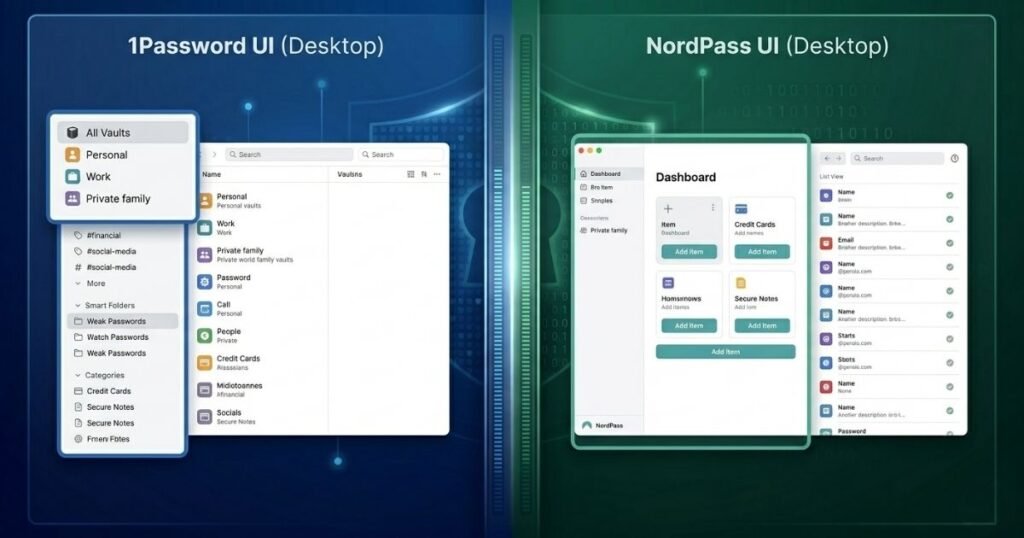
The user interfaces of these two platforms reflect their core philosophies, with NordPass opting for a clean aesthetic and 1Password choosing information density. The NordPass desktop application and mobile app feature a minimalistic design with plenty of white space, making it incredibly easy for beginners to find their logins and run security scans. 1Password presents a more dense and comprehensive dashboard that displays vaults, tags, categories, and account health notifications simultaneously, which power users appreciate but beginners might find intimidating. Regarding customer support, NordPass provides twenty four seven live chat alongside email assistance for immediate troubleshooting, while 1Password relies primarily on an active community forum and email support ticketing which can sometimes take longer to resolve urgent issues.
The Definitive Verdict
After thoroughly analyzing the cryptographic foundations, feature sets, operational workflows, and cost structures of both platforms, my professional verdict depends on your specific technical needs. For the vast majority of mainstream consumers, families, and casual users, NordPass is the superior choice because it eliminates unnecessary complexity while delivering top tier security. The combination of its modern XChaCha20 encryption algorithm, clean user interface, built in email masking, and highly affordable multi year pricing makes it a highly practical tool for daily digital life.
However, if you are a technical professional, software developer, remote worker, or enterprise administrator, 1Password remains the undisputed champion of password management. The added protection of the local Secret Key architecture, the inclusion of Travel Mode for physical data security, and native tools for managing developer secrets provide a level of security depth that NordPass cannot match. While you will pay a higher price and face a slightly steeper learning curve with 1Password, the investment is entirely justified if you require total control over your digital security architecture.

Hi, I am Priyanka Roy, an SEO Specialist and Content Writer at Sandhu Marketing Agency Inc.. For the past 4 years, I have been helping businesses improve their websites and grow their organic traffic through practical and effective SEO strategies.
I enjoy working on different SEO tools and exploring how they actually perform in real situations. Over time, I have tested many tools, faced real challenges, and learned what works and what does not. This is exactly what I share on Savenjoy. My goal is to help you understand what to expect from a tool before you spend your money on it.
Instead of just listing features, I focus on real experiences, honest insights, and simple explanations so you can make better decisions with confidence. All I want is to make your journey easier and smarter.
I love trying new digital tools even when I do not need them, just to see if they are worth it or not.