⚠️ Affiliate Disclosure: We earn a commission on purchases made via our links — at no extra cost to you.

What Is an AI Video Generator? The Ultimate 2026 Guide for Your Social Media Content Creation
AI video generation has officially crossed the line from emerging tech to a mainstream business tool. What once required expensive cameras, professional editors, actors, and weeks of production can now be done in minutes using advanced AI systems. For small business owners, digital marketers, and beginner creators, this shift is nothing short of revolutionary. You no longer need a studio setup or a massive budget to produce high-quality video content that drives engagement and conversions.
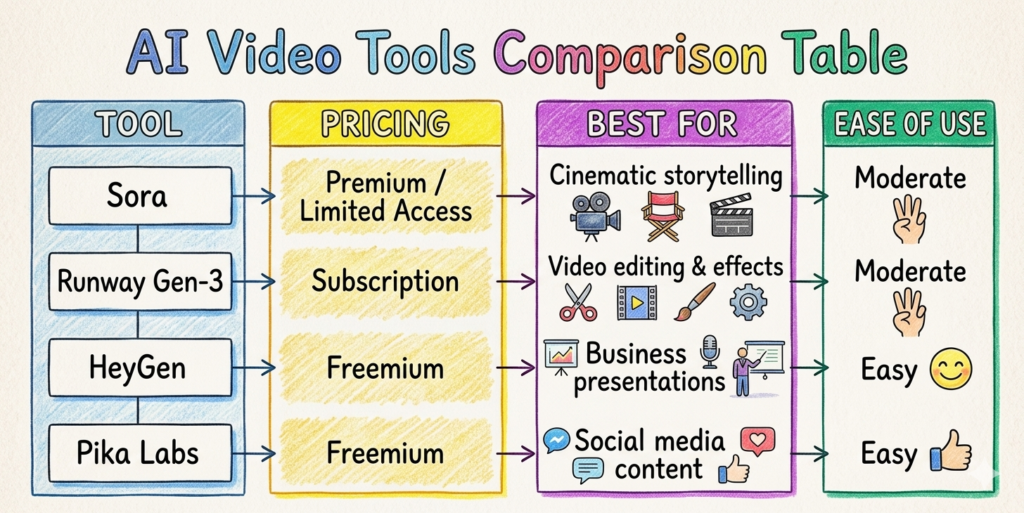
At the heart of this transformation are neural networks, diffusion models, and frame interpolation technologies. These systems allow AI tools to generate realistic visuals, smooth motion, and even human-like avatars that can speak in multiple languages. Platforms like Sora and Runway Gen-3 are pushing the boundaries of what’s possible, enabling users to turn simple text prompts into cinematic videos. As attention spans shrink and video dominates platforms like YouTube, Instagram, and LinkedIn, adopting AI video tools is no longer optional. It’s a competitive advantage.
What Is an AI Video Generator?
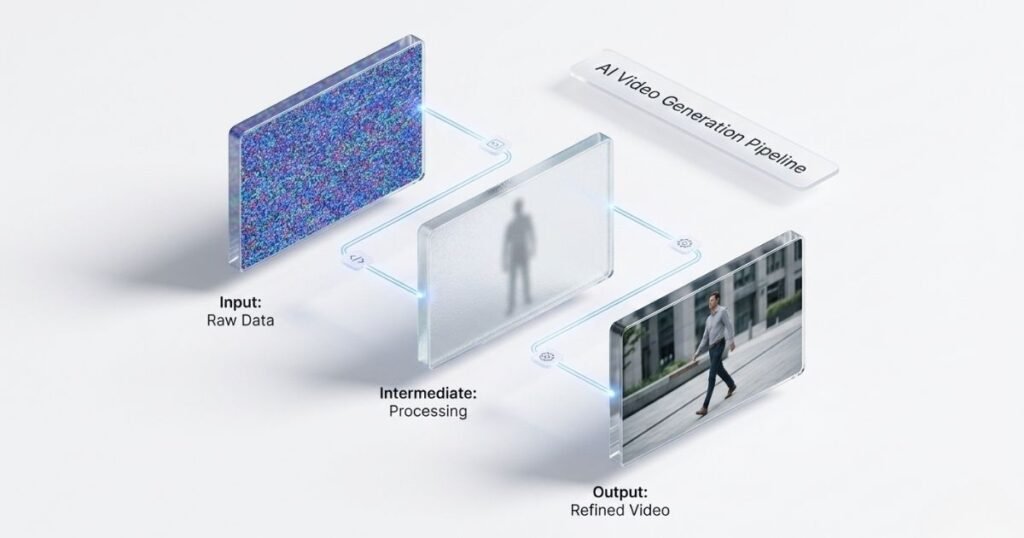
An AI video generator is a tool that uses artificial intelligence to create videos from text, images, or existing footage. Instead of manually editing clips, users provide inputs such as scripts, prompts, or product images, and the AI generates a complete video with visuals, transitions, voiceovers, and sometimes even avatars.
These systems rely heavily on deep learning neural networks, trained on massive datasets of images and videos. Diffusion models play a critical role by generating visuals frame by frame, gradually refining noise into realistic scenes. Meanwhile, frame interpolation ensures smooth transitions between frames, making the final output look natural and professional. The result is a system that can simulate camera movements, lighting effects, and even human expressions with surprising accuracy.
For businesses, this means faster production cycles, lower costs, and the ability to scale content creation without hiring a full production team. Whether you want product demos, explainer videos, or social media ads, AI video generators provide a powerful shortcut to high-quality content.
Learn more about AI Video Generator vs Traditional Editing
Key Benefits of AI Video Generators
1. Cost Efficiency
Traditional video production can cost thousands of dollars per project. AI tools eliminate expenses related to equipment, actors, editing software, and studio rentals. Small businesses can now produce professional videos at a fraction of the cost, making high-quality marketing accessible to everyone.
2. Speed and Scalability
AI video generator tools can generate videos in minutes instead of days or weeks. This allows marketers to produce content at scale, test multiple variations, and quickly adapt to trends. For example, you can create 10 different ad versions in one afternoon and test which performs best.
3. Personalization at Scale
Modern AI tools enable hyper-personalized video marketing. You can customize videos based on audience demographics, language, or user behavior. Imagine sending personalized product videos to each customer. This level of engagement was previously impossible at scale.
4. Accessibility for Beginners
You don’t need technical skills to get started. Platforms like HeyGen and Pika Labs offer intuitive interfaces where users simply type a script or upload content, and the AI handles the rest.
5. Consistency in Branding
AI ensures consistent visuals, tone, and messaging across all videos. This is especially useful for businesses that want to maintain a strong brand identity without relying on multiple editors or agencies.
Types of AI Video Generators

Text-to-Video Generators
Tools like Videoexpress.ai allow users to create videos directly from text prompts. These are ideal for storytelling, ads, and creative content. I’ve put together a detailed Videoexpress.ai review covering its features, pricing, and pros and cons. where I specifically analyze if its one-time payment plan is better than the monthly subscriptions of other AI tools.
Avatar-Based Video Generators
Platforms like HeyGen create videos using AI avatars that can speak scripts in different languages. Perfect for training videos, presentations, and customer support content.
Image-to-Video Tools
These tools convert static images into dynamic videos with motion effects and transitions, often using frame interpolation to create smooth animations.
Video Enhancement Tools
Tools like Runway Gen-3 enhance existing footage by adding effects, removing backgrounds, or generating new scenes.
Each type serves a different purpose, and the best choice depends on your business goals and content strategy.
How AI Video Generation Works
AI video generation is powered by a combination of advanced technologies that work together to produce realistic outputs. First, neural networks analyze input data such as text prompts or images. These networks are trained on millions of video samples, enabling them to understand patterns like motion, lighting, and composition.
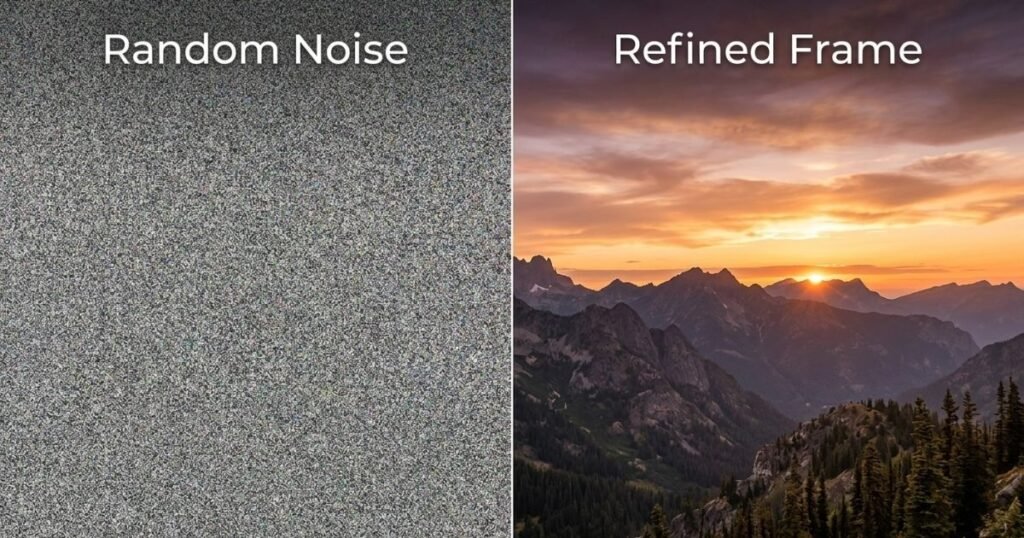
Next, diffusion models generate visuals by starting with random noise and gradually refining it into a coherent image. This process is repeated frame by frame to create a complete video sequence. The system predicts what each frame should look like based on the previous one, ensuring continuity.
Finally, frame interpolation smooths transitions between frames, reducing choppiness and creating fluid motion. Some tools also use voice synthesis models to generate realistic speech, matching lip movements with spoken words. The result is a fully automated pipeline that transforms simple inputs into polished video content.
Step-by-Step Guide: Create Your First AI Video in 5 Minutes
- Choose a Tool
Start with beginner-friendly platforms like HeyGen or Pika Labs. - Write a Simple Script
Keep it short and clear. For example: “Introducing our new eco-friendly water bottle.” - Select Visual Style or Avatar
Choose whether you want an AI avatar, animation, or realistic video. - Customize Elements
Add branding, colors, logos, and voice preferences. - Generate and Download
Click generate and let the AI create your video within minutes.
This process removes technical barriers, allowing anyone to create professional content quickly.
Real Case Study: How a Small Brand Scaled with AI Video
A small e-commerce skincare brand struggled with high production costs and low engagement on social media. Traditional video shoots were expensive, and they could only produce one or two videos per month. After adopting HeyGen, they transformed their content strategy completely.
They started creating AI-generated product demo videos using avatars that explained product benefits in multiple languages. By leveraging neural network-driven voice synthesis and frame interpolation. The videos looked polished and professional. Within three months, the brand reduced production costs by 80% and increased engagement by 40% across Instagram and TikTok.
More importantly, they were able to test different messaging styles quickly. By generating multiple variations of the same video, they identified what resonated most with their audience. This data-driven approach significantly improved their conversion rates and ROI.
Ethical and Safety Considerations
Deepfakes and Misuse
AI video technology can be misused to create deepfakes, which are realistic but fake videos. This raises concerns about misinformation and trust.
Watermarking and Transparency
Technologies like SynthID help embed invisible watermarks into AI-generated content, making it easier to identify and verify authenticity.
Copyright Issues
AI-generated content may raise questions about ownership and originality. Businesses should ensure they use licensed assets and comply with platform policies.
Building trust is essential. By being transparent about AI usage and following ethical guidelines, businesses can use this technology responsibly.
Future Trends in AI Video
Multimodal AI
Future systems will combine text, audio, video, and even user behavior data to create highly personalized content.
Personalized Video Marketing
AI will enable real-time customization, where each viewer sees a slightly different version of the same video based on their preferences.
Real-Time Video Generation
Live AI-generated video content could become a reality, enabling interactive experiences and dynamic storytelling.
These advancements will further blur the line between human-created and AI-generated content, making video production faster and more accessible than ever.
Conclusion:
AI video generators are not just a trend. They are a fundamental shift in content creation. They empower businesses to create high-quality videos faster, cheaper, and more efficiently than ever before. Whether you’re a small business owner looking to boost sales, a marketer aiming to scale campaigns, or a beginner creator exploring new tools, AI video technology offers endless possibilities.
The sooner you adopt these tools, the faster you can gain a competitive edge. Start small, experiment with different formats, and let AI handle the heavy lifting while you focus on strategy and creativity.
Read Also Create Videos in Minutes with the Best AI Video Generator Tools
FAQs
What does an AI video generator do?
An AI video generator creates videos automatically using inputs like text, images, or scripts. It uses technologies such as neural networks and diffusion models to generate visuals, voiceovers, and animations without manual editing.
How do I use an AI video generator?
You simply choose a tool, enter your script or prompt, customize the visuals, and click generate. Most platforms are beginner-friendly and require no technical skills.
Is an AI video generator safe?
Yes, most tools are safe when used responsibly. However, users should be aware of ethical concerns like deepfakes and ensure they follow platform guidelines.
What’s the most common AI video generator?
Popular tools include Runway Gen-3, HeyGen, and Pika Labs, each catering to different use cases.
Can I customize AI-generated videos?
Yes, you can customize scripts, visuals, branding, voiceovers, and even target audience preferences.
Is AI video generation ethical and safe?
It can be ethical if used responsibly. Transparency, watermarking, and respecting copyright laws are key to maintaining trust.
What is the best AI video generator?
The best tool depends on your needs. For cinematic videos, Sora is powerful, while HeyGen is ideal for business content.

Hi, I am Priyanka Roy, an SEO Specialist and Content Writer at Sandhu Marketing Agency Inc.. For the past 4 years, I have been helping businesses improve their websites and grow their organic traffic through practical and effective SEO strategies.
I enjoy working on different SEO tools and exploring how they actually perform in real situations. Over time, I have tested many tools, faced real challenges, and learned what works and what does not. This is exactly what I share on Savenjoy. My goal is to help you understand what to expect from a tool before you spend your money on it.
Instead of just listing features, I focus on real experiences, honest insights, and simple explanations so you can make better decisions with confidence. All I want is to make your journey easier and smarter.
I love trying new digital tools even when I do not need them, just to see if they are worth it or not.